
0%
Less credentialing paperwork time
Reduce manual document gathering, faxing, and repetitive form filling.
Secure physician credential vault for licensed medical professionals. Reduce credentialing paperwork by up to 80%, share with hospitals in under a minute, and streamline annual CAQH and PECOS updates—all in one physician-owned vault with NPI verification, delegate access, and immutable audit history.
Web registration required.
Free to start · No credit card required
mdid.health/dashboard
Good morning
Internal Medicine · NPI verified
Documents
24
Expiring
2
Delegates
3
Audit events
148
Medical License
Board Certification
By the numbers
Reduce credentialing paperwork time by up to 80% and complete institutional data sharing in under one minute—while keeping full control of your credentials.
0%
Reduce manual document gathering, faxing, and repetitive form filling.
<0 min
Complete scoped vault sharing with hospitals and credentialing teams in under a minute.
0
Streamline annual CAQH ProView and CMS PECOS updates from a single credential source.
0%
Your documents stay yours — revoke delegate access instantly, anytime.
Every year, physicians and practice admins lose hours re-entering the same data across CAQH ProView and CMS PECOS. MDID keeps credentials current in one vault and enables scoped delegate push—turning multi-hour admin work into minutes.
MDID Vault
CAQH ProView
CMS PECOS
Keep licenses, board certifications, and malpractice coverage synchronized. Delegates with CAQH push permission update ProView from your vault—no duplicate uploads or email chains.
Streamline Medicare enrollment maintenance. Authorized staff can push verified credentials and practice data for PECOS updates without attachments, fax, or lost documents.
When credentialing stops eating your week, physicians tell colleagues and practice managers. MDID turns a universal pain point into a competitive advantage for your group.
Turn annual CAQH & PECOS pain into minutes
One vault. Scoped delegate push. Instant revoke. Built for physicians and the practices that support them.
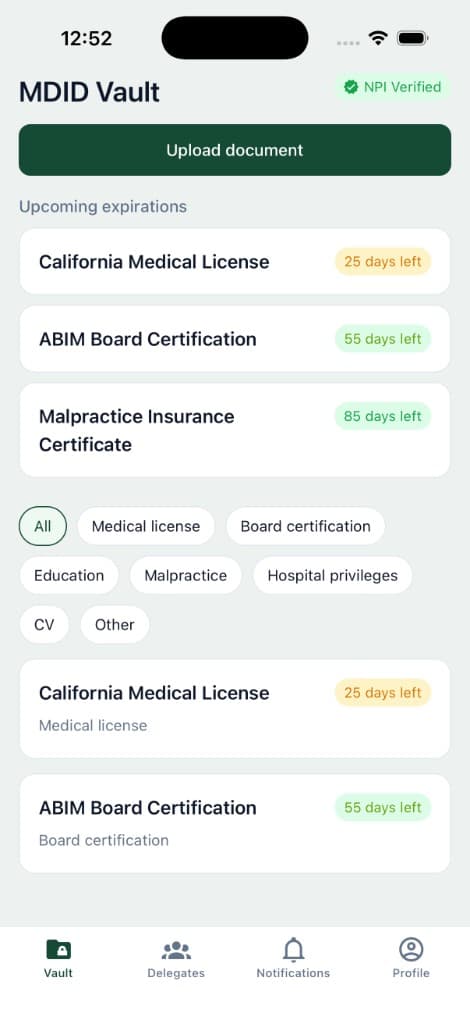
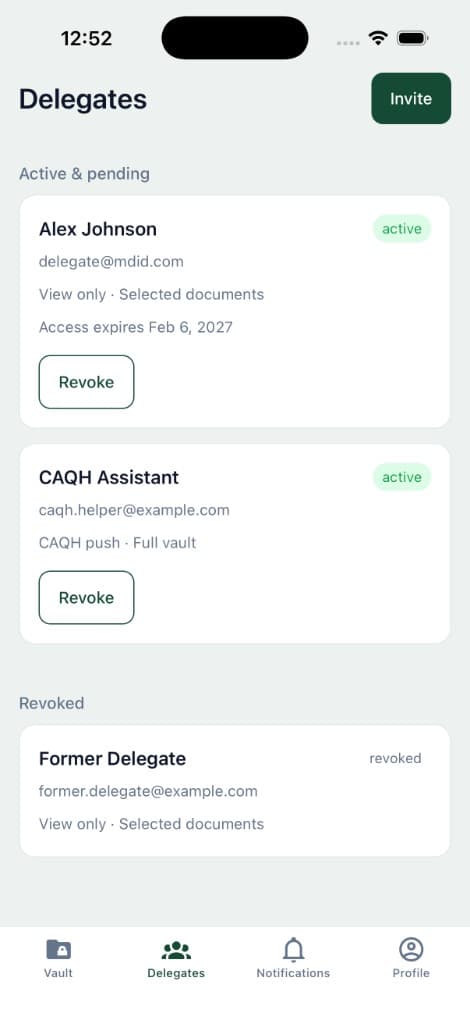
Web & mobile
Access your credential vault from the web dashboard or native mobile apps. Upload documents, review expiry alerts, and manage delegates — wherever your practice takes you.
Web registration required.
Platform capabilities
From CAQH and PECOS integration to secure storage, delegate-based sharing, and compliance-ready audit trails—MDID unifies credentialing workflows in one physician-owned vault.
See allStore licenses, board certifications, malpractice insurance, hospital privileges, CVs, and more. Versioning, archive history, and metadata tagging included.
Validate physician identity during onboarding through the NPPES registry. Verified NPI displays as a trusted badge on your profile.
Automated daily scans with alerts at 90, 60, 30, and 7 days before expiration. Stay ahead of renewals via email and in-app notifications.
Stop dreading annual CAQH ProView and PECOS re-attestation cycles. Keep credentials current in one vault and let delegates push updates—turning hours of admin into minutes.
Invite delegates with scoped permissions—view only, CAQH push, or PECOS push. Control full vault or selected documents with instant revoke.
Immutable, append-only audit trail for logins, uploads, downloads, views, deletions, and delegate actions. Filter and export to CSV.
Centralized bell notifications with read/unread state, plus transactional emails for invites, expiry alerts, and access changes.
Onboarding
A guided onboarding flow with auto-save progress—resume anytime and enter your dashboard when verification and your first credential are complete.
Create your secure login with MFA and complete your physician profile.
Add practice location, hospital affiliations, and contact details.
Verify your NPI through the NPPES registry and earn your verified badge.
Upload your first credentials to populate your encrypted vault.
Invite delegates, review permissions, and enter your dashboard.
Security & compliance
No raw documents in the application database. Encrypted S3 storage, signed URL access only, mandatory MFA, and immutable audit logging—designed for HIPAA-aware credential management.
Designed for healthcare compliance with encryption at rest and in transit.
Mandatory multi-factor authentication with 30-minute session timeout enforcement.
Documents stored in encrypted S3—accessed only through signed URLs, never in the database.
Every action is recorded in an append-only audit system for full traceability.
Trusted by clinicians
Physicians, nurse practitioners, and clinical staff rely on MDID to keep credentials secure and accessible.
“Lorem ipsum dolor sit amet, consectetur adipiscing elit, sed do eiusmod tempor incididunt ut labore et dolore magna aliqua. Ut enim ad minim veniam, quis nostrud exercitation ullamco laboris nisi ut aliquip ex ea commodo consequat.”
“Lorem ipsum dolor sit amet, consectetur adipiscing elit, sed do eiusmod tempor incididunt ut labore et dolore magna aliqua. Ut enim ad minim veniam, quis nostrud exercitation ullamco laboris nisi ut aliquip ex ea commodo consequat.”
“Lorem ipsum dolor sit amet, consectetur adipiscing elit, sed do eiusmod tempor incididunt ut labore et dolore magna aliqua. Ut enim ad minim veniam, quis nostrud exercitation ullamco laboris nisi ut aliquip ex ea commodo consequat.”
Subscription plans
Start with essentials or scale to Professional for unlimited documents, delegate management, and CAQH push. Enterprise plans available for health systems.
Get started with essential credential storage.
$228/year
Full vault power for active practitioners.
Tailored solutions for health systems and groups.
Powered by Stripe · Upgrade, downgrade, or cancel anytime · Full billing history
Quick answers about data ownership, storage, and subscriptions.
You own them entirely. MDID only provides an encrypted storage space — your credentials remain yours.
Encrypted AWS S3. It can only be accessed via signed URLs — never stored in the application database.
Your data will be retained for 30 days after cancellation, after which it will be permanently deleted.
Yes, it will be maintained. Upgrading keeps your vault and documents intact.